 USD
Aurevia - WooCommerce Fashion, Lifestyle & Jewelry WordPress Theme with Elementor, 3 One-Click Demos and Dark Mode
Product overview
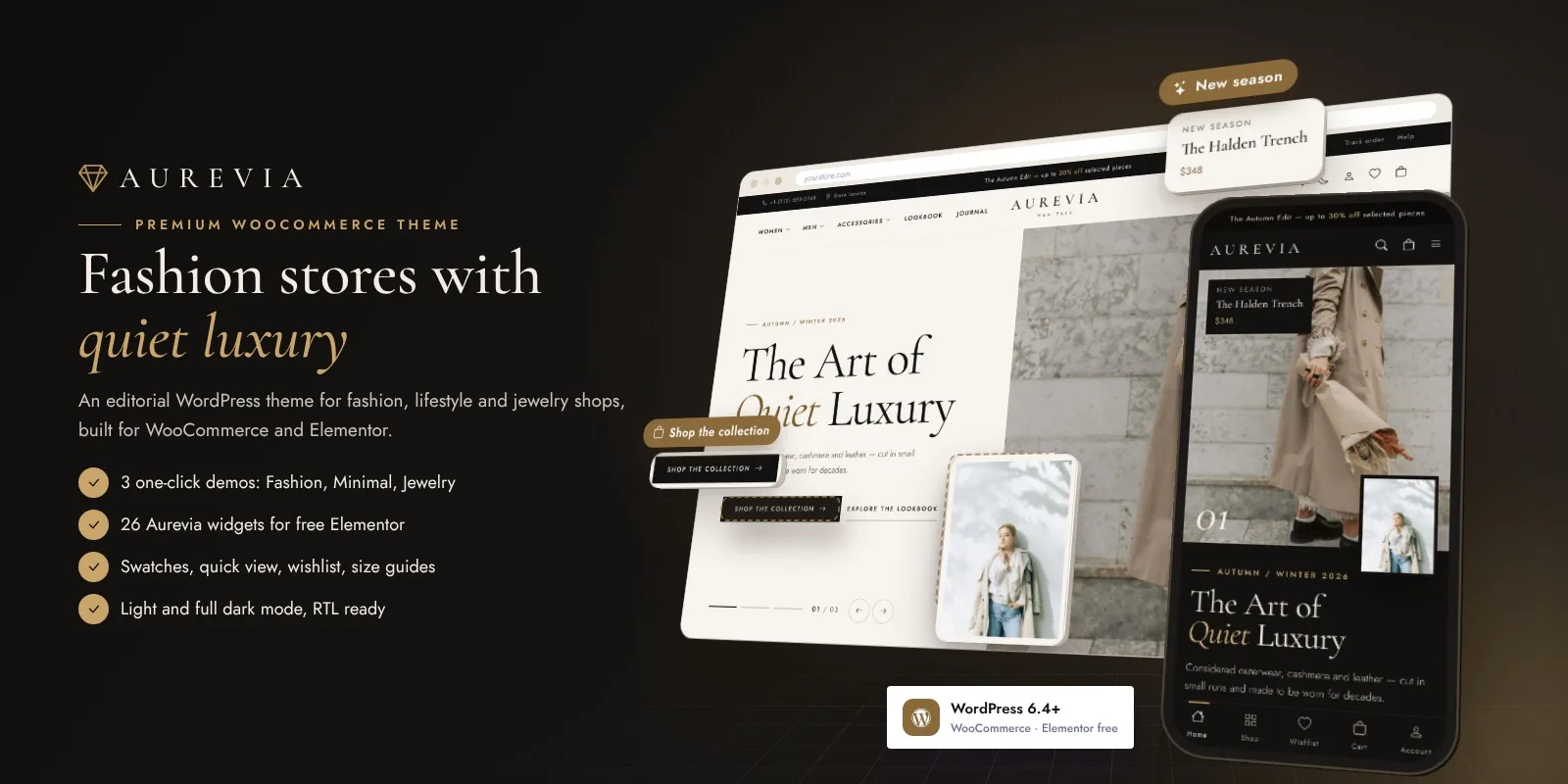
Elegant WooCommerce theme for fashion, lifestyle and jewelry stores: 3 one-click demos, 26 Elementor widgets, swatches, quick view, wishlist, size guides, theme dashboard, child theme and full dark mode.
Item details
Product demo
Description
Aurevia - an editorial WooCommerce theme for fashion, lifestyle and jewelry stores
Aurevia is a premium WordPress theme for WooCommerce stores that sell clothing, home & lifestyle pieces or fine jewelry. Calm editorial typography, a centered-logo header with mega menus, shop filters with colour and size swatches, quick view, a wishlist, size guides, shoppable lookbooks and a full dark mode - ready in minutes with three one-click demos.
Every home section is one of 26 Aurevia widgets for the free Elementor, so you change texts, images, colours and products without code. A theme dashboard guides you through setup, installs the required plugins and checks your server. Parent theme, child theme and the Aurevia Core companion plugin are included.
Live demo - tap an image
Three demos, one theme
- Fashion - editorial hero slider, category tiles, new arrivals with tabs, deal of the week, lookbook hotspots and testimonials
- Minimal / Lifestyle - a calm home and living store with rooms, the calm edit and a feature story
- Jewelry & Accessories - dark-luxe gold and pearls with collections, new treasures and an emerald lookbook
- Import in one click; every section can be used on any page
26 widgets for the free Elementor
Hero sliders, category tiles, product grids with tabs, carousels, editorial and split banners, a deal countdown, lookbook hotspots, testimonials, newsletter, team, timeline, store card, FAQ and more - each with content, style and responsive controls. Header and footer can be Elementor templates, and pages also work with the block editor.
Shop filters with swatches
- Categories, price slider, colour swatches, sizes, brands and rating in the theme design
- Grid or list view, 2-4 columns, load more, infinite scroll or page numbers
- Product cards with hover image, badges, colour dots, wishlist and quick view; filter drawer on phones
A product page that sells
Gallery with thumbs left, below or as a grid, zoom and lightbox, image and size swatches from your WooCommerce attributes, size guide, stock note, delivery & returns, perks, a sticky add-to-cart bar, reviews, related and recently viewed products.
Quick view, wishlist and size guides
- Quick view with swatches and add to cart, right from the shop
- Wishlist for guests and customers, with its own page
- Size guides for women, men, shoes and rings - a default per store or one per product
- Mini cart drawer with a free-shipping note
A theme dashboard that guides you
A welcome hub with a setup checklist built from your real store state, quick actions, one-click install of the required plugins, a system status report you can copy and a one-click child theme.
One-click demo import
Pick a demo and the parts you want. The importer works in short steps that resume after a timeout, rewrites every link for your address - also in a sub-folder install - and can remove only the content an earlier demo import created.
Theme options and colours
- 4 colour presets or your own 6 brand colours; button text contrast is chosen automatically
- 3 self-hosted font pairs, base font size and the default light or dark mode
- Header, footer, shop, product page, blog, social networks and performance settings, plus import / export
- Live preview in the Customizer
Full dark mode and RTL
Visitors switch between light and dark with no flash, and you choose the default. Right-to-left languages are supported with an RTL stylesheet, and every text is translation ready.
What you get
- The Aurevia parent theme, the Aurevia Child theme and the Aurevia Core companion plugin
- Three importable demos with products, variations, pages, posts, lookbooks, menus, widgets, theme options and photos
- Illustrated HTML documentation
Good to know
- Payments, shipping and taxes are handled by WooCommerce and its payment plugins.
- Elementor Pro is not required; the free Elementor is enough for every demo page.
- All products, names and prices of the demo are sample content.
Support and updates
Support covers installation, configuration and bugs in the item. Customisation and third-party plugins are not included.
Core features
Three one-click demos
- Fashion (main), Minimal / Lifestyle and Jewelry & Accessories - each with its own home page, products with variations, menus, widgets and theme options
- Choose the parts to import; short resumable steps that work on shared hosting and in a sub-folder install
- Re-import or switch demos; optionally remove only the content an earlier import created
Elementor (free) and the block editor
- 26 Aurevia widgets (hero sliders, category tiles, product grid with tabs, carousel, banners, deal countdown, lookbook hotspots, testimonials, Instagram-style grid, newsletter, brand logos, icon boxes, stats, team, timeline, store card, FAQ, posts grid, CTA and more)
- Header and footer as Elementor templates; Elementor Pro theme builder locations supported
- Block patterns for about, contact and FAQ sections
WooCommerce store
- Shop filters in the theme design: categories, price slider, colour swatches, sizes, brands, rating; filter drawer on phones
- Grid or list view, 2-4 columns, load more, infinite scroll or page numbers; product cards with hover image, badges, wishlist and quick view
- Product page: gallery layouts, zoom and lightbox, image and size swatches, size guide, stock note, delivery & returns, perks, sticky add-to-cart, product video, related and recently viewed
- Quick view, wishlist for guests and customers, size guides (women, men, shoes, rings)
- Mini cart drawer, styled cart, checkout and My account; HPOS and cart / checkout blocks compatible
Header, menus and content
- Header layouts centered, left or split, promo bar, live product search, mega menus with promo images, phone bottom bar
- Shoppable lookbooks with hotspots, journal (grid, list or masonry), about, contact and FAQ templates, 404 page
- Newsletter with subscriber CSV export, contact form, social share
Dashboard and options
- Theme dashboard with setup checklist, one-click required plugins, system status report and one-click child theme
- Theme options (general, header, footer, colours & typography, shop, product, blog, social networks, performance, import / export) with Customizer live preview
- 4 colour presets or 6 custom colours with automatic button text contrast; 3 self-hosted font pairs
- Social networks: built-in list plus your own networks with uploaded icons
Design and code
- Light and full dark mode; fully responsive; RTL; translation ready
- Parent + child theme + companion plugin following WordPress coding standards
- Self-hosted fonts and icons, lazy loading, font preloading and deferred scripts
Server requirements
- WordPress 6.4 or newer
- PHP 8.1 or newer (8.2 / 8.3 recommended)
- MySQL 8.0+ or MariaDB 10.5+
- WooCommerce and Elementor (free plugins) - installed from the theme dashboard; Elementor Pro not required
- Aurevia Core companion plugin - included, installed from the theme dashboard
- PHP memory limit 256 MB recommended; upload limit 16 MB to upload the theme in wp-admin (or upload by FTP / cPanel)
Installation instructions
Install
- Appearance > Themes > Add New > Upload Theme: choose aurevia.zip, install and activate.
- Aurevia > Plugins: click Install required plugins (Aurevia Core, Elementor, WooCommerce).
- Aurevia > Demo import: choose Fashion, Minimal or Jewelry and click Start import.
- Set your logo, colours, fonts and texts in Aurevia > Theme options or the Customizer; edit pages with Elementor.
- Optional: Aurevia > Dashboard > Create & activate child theme.
Full guide: documentation/index.html in the download, also online at /codester/docs/ on the demo.
Changelog
Version 1.0.0 – November 2026
- Initial release: parent theme, child theme and Aurevia Core plugin.
- Three one-click demos (Fashion, Minimal / Lifestyle, Jewelry & Accessories).
- 26 Elementor widgets, theme dashboard, theme options, dark mode, RTL.
- WooCommerce: swatches, filters, quick view, wishlist, size guides, HPOS and blocks compatible.
Customer reviews
No reviews yet. Only customers who bought this product can write one.