 USD
 Music
MP3Nest – Music Download & Artist Upload Platform (Laravel PHP Script)
Product overview
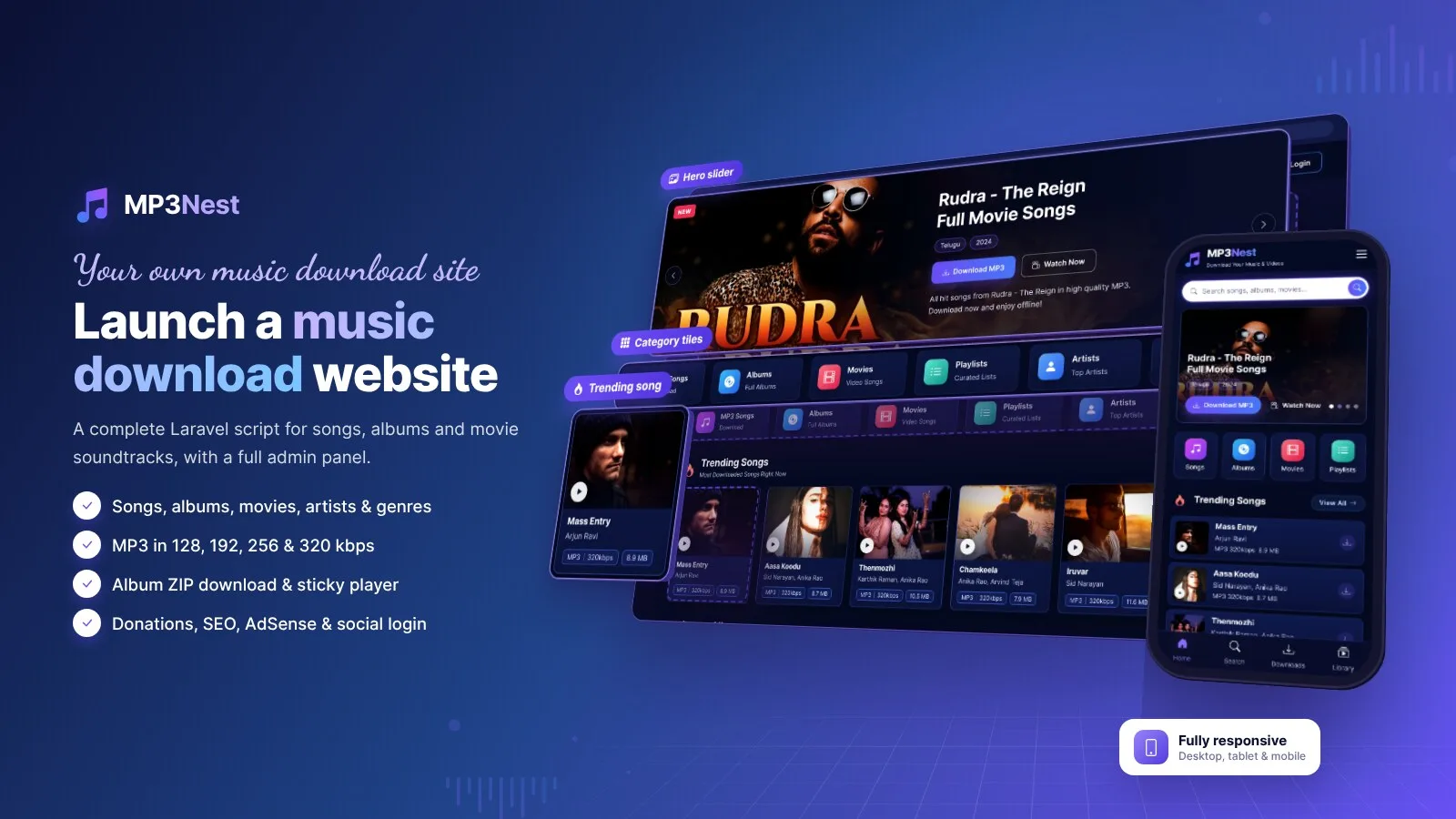
A complete music website: songs, albums, playlists and MP3 downloads, plus an Artist Studio where artists upload their own music and you approve it before it goes live.
Item details
Product demo
Description
Launch your own music platform
MP3Nest is a ready-made Laravel script for a music streaming and download website. Visitors browse songs, albums, artists, genres and playlists, listen with a sticky player and download MP3s in up to four qualities. Members get a personal library with favourites, playlists and history.
New in 1.1.0: Artist Studio
Turn your site into a platform for independent artists. A member asks to become an artist, you approve the request, and the artist uploads their own songs with cover art, lyrics and credits. Every upload waits for your review: listen to it in the admin panel, then publish it or decline it with a reason. Artists get an e-mail for every decision and see their plays and downloads.
Built for real hosting
Browser installer, no build tools, works on shared hosting (cPanel) and VPS. Audio files are stored outside the web folder or on cloud storage (Cloudflare R2, Amazon S3, Wasabi, Backblaze B2, Bunny.net, FTP, SFTP), and downloads use signed links that expire. Updates install without SSH using the "Update Database" button.
Earn from your site
Google AdSense slots, Meta Pixel and a donations page with Stripe, PayPal, Razorpay and bank transfer – every payment is verified with the provider.
All song, album, movie and artist names in the demo are fictional sample content.
Core features
Artist Studio (new in 1.1.0)
- Members request an artist account; admin approves and links it to a new or existing artist page
- Artists upload MP3s with cover, lyrics, genre, language and credits – title, length and cover read from the MP3 tags
- Every upload waits for admin review (listen, approve or decline with a reason) – or publish without review
- Artist dashboard with live songs, songs in review, plays and downloads
- E-mails for every decision, admin notifications, daily upload limit, artists can only change their own songs
Music library
- Songs, albums, movie songs, artists, genres, languages and playlists
- Up to four qualities per song (128, 192, 256, 320 kbps) – created automatically with ffmpeg
- Album ZIP downloads, lyrics, YouTube video songs, trending by downloads
- Bulk upload with a ZIP of MP3s or CSV import
Listening & downloads
- Sticky audio player, inline players and waveform song page
- Signed download links that expire, audio outside the web root, hotlink protection
- Cloud storage: R2, S3, Wasabi, B2, Spaces, Bunny.net, FTP, SFTP or direct links
Members
- Favourites, own playlists, download and listening history
- Google and Facebook login, e-mail verification, comments with moderation, song requests
Admin panel
- Dashboard, analytics, activity log, administrators and two-step login
- Two home layouts, two song layouts, four themes and colour presets
- Page builder, menus, 15 editable HTML e-mail templates, SMTP
- SEO with schema.org and sitemap, Google AdSense and Meta Pixel
- Donations with Stripe, PayPal, Razorpay and bank transfer
- Backup & restore, changeable admin folder, demo mode, multi-language, PWA
Server requirements
- PHP 8.3 or newer
- MySQL 5.7+ / 8.x or MariaDB 10.x+
- PHP extensions: PDO MySQL, mbstring, openssl, fileinfo, curl, gd, zip
- Shared hosting (cPanel) or VPS with Apache or Nginx
- Optional: ffmpeg for automatic bitrates, cron job for scheduled tasks
Installation instructions
New installation
- Create an empty MySQL database and user in your hosting panel.
- Upload the contents of the mp3nest folder to your domain folder (e.g. public_html).
- Open your domain – the web installer checks the server and asks for the database, site name, admin account and admin folder. Tick "Import demo content" to see every feature.
- Add the cron job shown at the end of the installer.
- Set your logo, colours, SMTP, ads and payment methods in the admin panel.
Updating from 1.0.0
- Back up the database and the public/uploads and storage/app/private folders.
- Upload the update package over the old files.
- Admin → System Settings → Update Database, then Clear Cache.
The illustrated guide is in documentation/index.html.
Changelog
1.1.0 – November 2026
- New: Admin › Languages › Translate – every text of the website in one place, including texts written in the admin, e-mails and form errors. Languages with flags, right-to-left support, a default language for every visitor, JSON export/import. Translations are kept safe during updates.
- New: "Install app" message and buttons (Android, computers) and an iPhone "Add to Home Screen" hint, all texts editable (Admin › App (PWA)).
- New: Visitor accounts switch – turn sign up and login on or off (Admin › Features).
- New: number of trending songs on the home page, both layouts, computers and phones.
- Improved: trending searches one per line; header stays on screen at every width; updates apply themselves on the first visit.
- Update package now works from 1.0.0 and 1.0.1 (folder Update-from-1.0.x, extract directly in your site folder).
1.0.1 – November 2026
- Fixed: the phone menu and the side menu now follow Admin › Menus (show, hide, rename and reorder links).
1.0.0
- Initial release.
Reviews
Customer reviews
No reviews yet. Only customers who bought this product can write one.